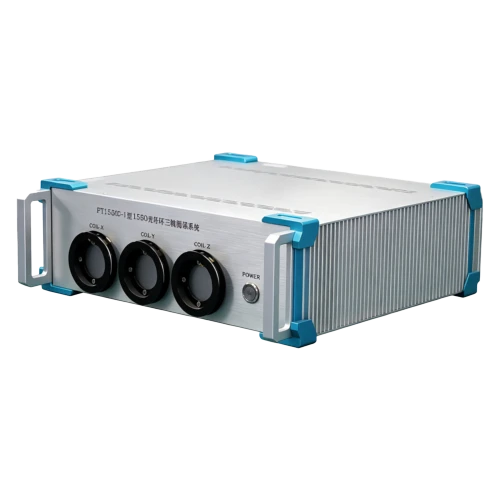
FCTS1310C Fiber Coil Test System
Test time range:1sec–30 hrs
Measurable fiber coil length: 280–1200 m
Configurable via test software
Description
Key Features
- Excellent bias stability, optimal ≤0.01°/hr (100s avg., coil length dependent)
- Three test channels, mutually independent
- Operating wavelength: 1310 nm
- Test time range:1sec–30 hrs
- Measurable fiber coil length: 280–1200 m
- Configurable via test software
Applications
- Fiber coil production testing
- Fiber coil pre-use screening
Product Introduction
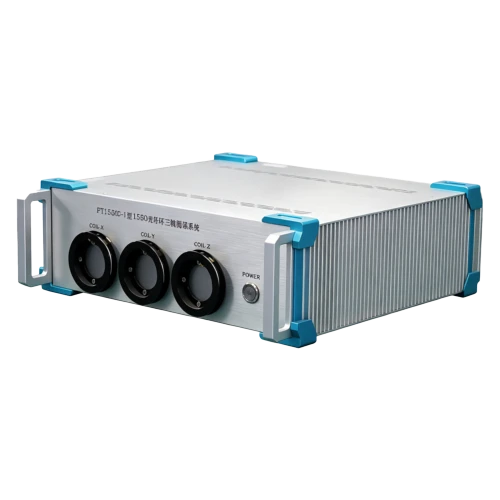
Company FCTS1310C fiber coil test system is a three-axis high-precision gyro bias testing device for gyro-grade performance evaluation of 1310 nm fiber coils. Its operating principle is similar to a three-axis FOG, outputting angular rate and temperature data directly via a serial port. With dedicated test software, data can be recorded, analyzed, and stored to obtain key performance indicators such as bias and bias stability. The system can fusion-splice and test three fiber coils simultaneously, with the three channels operating independently without mutual interference. Featuring full functionality, stable performance, simple operation, and easy portability, it is a practical and reliable test system.
Unique Technology
Company is a high-tech enterprise with full closed-loop capabilities from fiber winding equipment and coils to FOGs, fiber/MEMS inertial products, IMU circuits, software, and test equipment. End-to-end process control improves quality and reduces costs. Operating under ISO9001 with strict processes, it ensures product reliability and consistency.
Parameters
FCTS1310C Fiber Coil Test System Specifications
|
Parameter |
Specifications |
|
Performance Specifications |
|
|
Operating Wavelength (nm) |
1310 |
|
Bias Stability (°/hr) |
≤0.01 (25°C, 100s avg., coil length dependent) |
|
Operating Temperature (°C) |
25±15 |
|
Measurable Temperature Range (°C) |
-45 ~ +70 |
|
Measurable Optical Module Length (m) |
280–1200 (based on actual coil length, configured via test software) |
|
Test Time Range |
1sec ~ 30hrs |
|
Electrical/Mechanical Interface |
|
|
Dimensions (mm) |
450×147×452 |
|
Power Supply (V, Hz) |
220, 50, AC |
|
I/O Serial Port |
RS422 (default), RS232 (optional) |
|
Temperature Sensor |
3 pcs, DS18B20, aviation connector |
|
Pigtail |
Panda PM fiber PM1310_80/135, 2 m per end, 3 channels |
Customization Information
Customizable to customer requirements
Introduction
The FCTS1310C fiber coil test system is a three-axis high-precision gyro bias test system that can be used for gyro-level test and evaluation of fiber coils with working wavelength of 1310nm, as shown in figure 1. Its technical principle is similar to that of a three-axis FOG, and angular velocity data and temperature data can be directly output through a serial port, as shown in figure 2. Through the use of special test software, we can record, analyze and store data, so as to get important information such as bias, bias stability, and so on. FCTS1310C test system can connect up to three coils at a time, and conduct three channel tests simultaneously without interfering with each other. This system has the advantages of complete functions, stable performance, simple operation, and easy to ship, which makes it a practical test system.
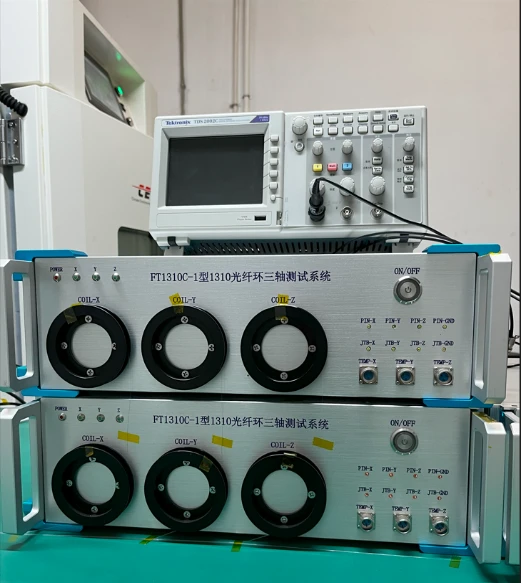
Figure 1. FCTS1310C Fiber Coil Test System
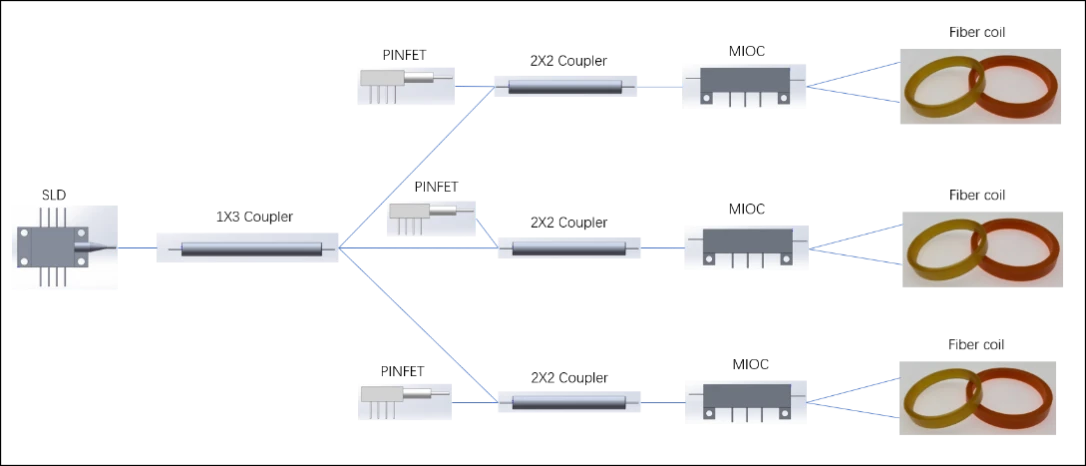
Figure 2. Technical Principle
Composition
The FCTS1310C test system consists of three parts: fiber coil test unit, RS422/USB adapter, special test software, as shown in figure 3. The FCTS1310C test system is assembled using an aluminum alloy 3U chassis and outputs data through the RS422 serial port. The RS422/USB adapter converts serial port data into USB data, facilitating communicaiton with the computer. The test software is compatible with computer OS such as Windows XP, 7 and 10, etc, and has a windowed interface that enables real real-time data acquisition, processing and storage, as shown in figure 4.
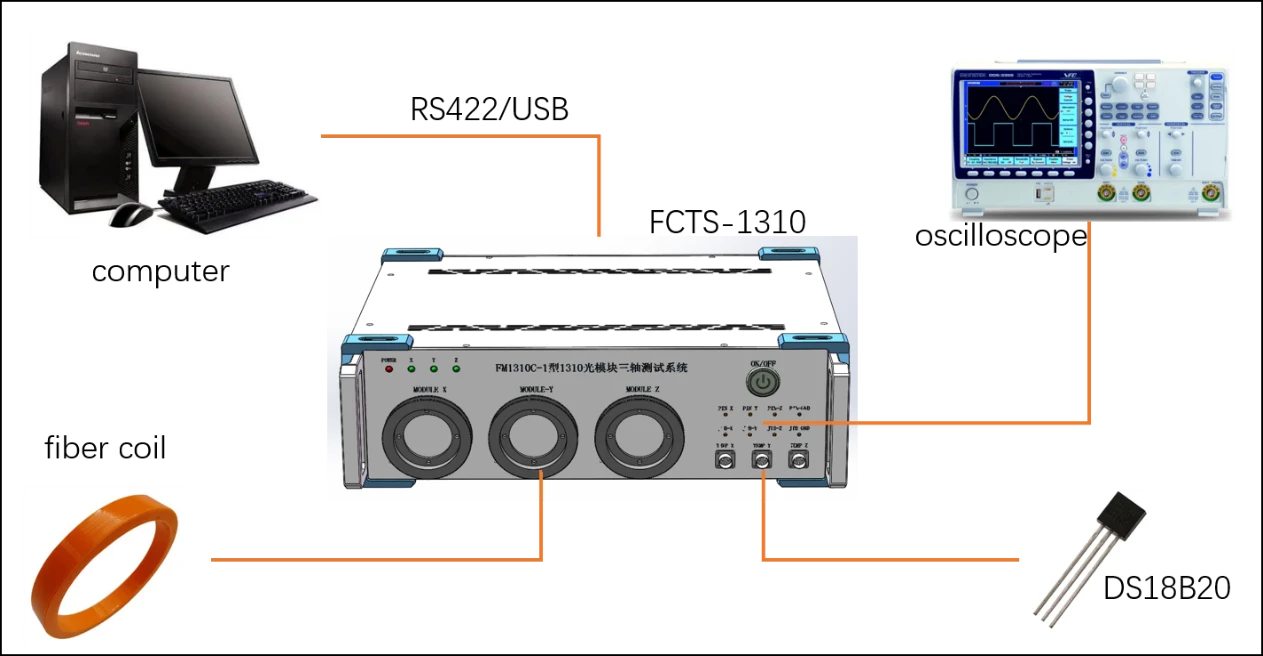
Figure 3. Test Connection Diagram
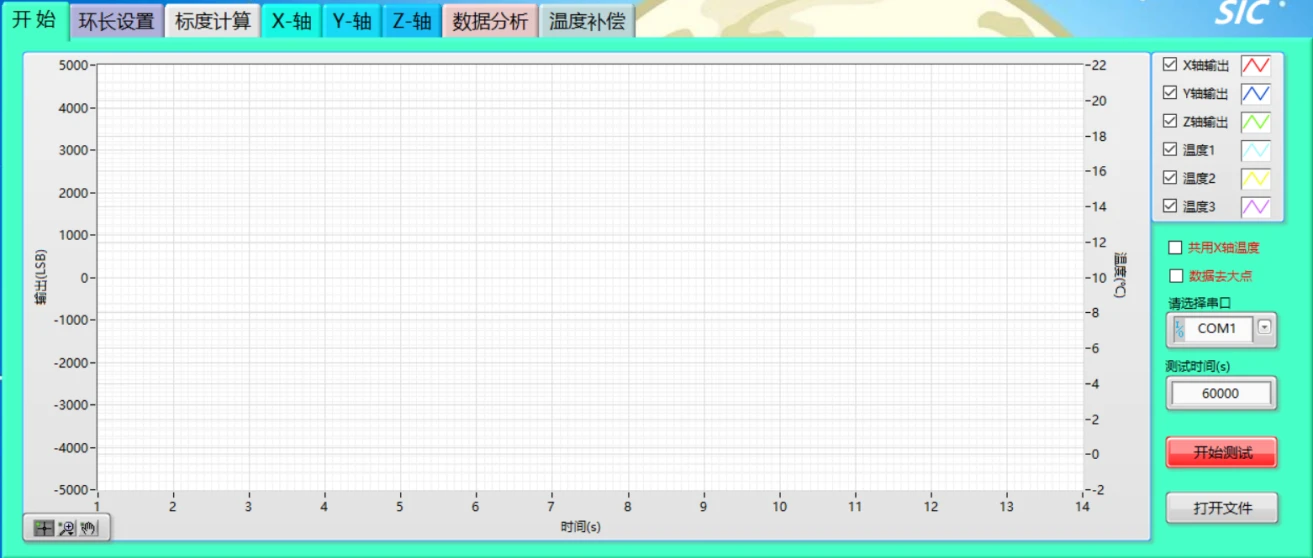
Figure 4. FCTS1310C Software
Specifications
The main performance specificaitons of FCTS1310C are as follows:
Table 1 FCTS1310C Specifications
|
No. |
Items |
Specifications |
Remark |
|
Size |
~(450×147×452)mm |
Aluminum alloy chassis |
|
|
Power supply |
220V |
50Hz, AC |
|
|
Power consumption |
≤8W |
||
|
Wavelength |
1310nm |
||
|
Working temperature |
(25±15)℃ |
Recommended working at room temperature |
|
|
Measurable temperature |
(-45~+70)℃ |
||
|
Measurable coil length |
(280~1200)m |
Adjustable |
|
|
Test time range |
1s~30h |
||
|
Bias stability |
Optimal ≤0.01°/h(100s, avg.) (room temperature) |
Relate to the coil length |
|
|
Output serial port |
RS422(default) RS232(optional) |
||
|
Temperature sensor |
3, DS18B20, aviation plug |
||
|
Tail fiber |
Panda PM fiber PM1310_80/135, 2*2m, 3 channels |
Can test three coils simultaneously |
4. Panel Description
4.1 Front panel
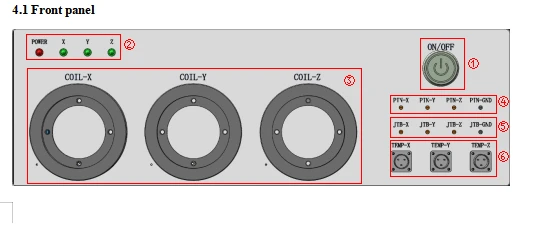
①:Startup button, press it and the lamp will light up and the circuit will be powered on
②:Working indicators, the light is always on when the device is working. From left to right, there are indicators of power, X-axis, Y-axis, and Z-axis.
③:Tail fiber: from left to right, there are MIOC tail fibers of X-aixs, Y-axis, and Z-axis, which are used to fuse with the tail fibers of fiber coils.
④:PIN test points, from left to right, there are test points of X-PINFET, Y-PINFET, Z-PINFET and GND. Those points are used to connect with oscilloscope to check the PIN signals.
⑤:Step wave test points, from left to right, there are test points of X-MIOC, Y-MIOC, Z-MIOC and GND. Those points are used to connect with oscilloscope to check the step wave of MIOC.
⑥:Temperature detector aviation plug, is used to connect with the temperature detector cable.
4.2 Back Panel
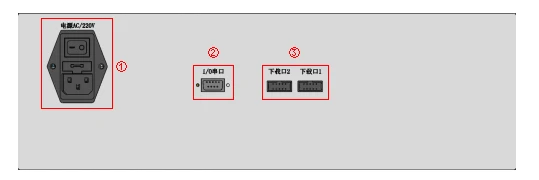
①: AC power supply socket and switch (including 3A fuse), connected to electric supply, requirements: AC 220V±10%, 50Hz.
②: I/O serial port, connected with computer through RS422/USB converter, and the pins are defined as follows:
|
Pin |
Definition |
|
1 |
RX+ |
|
2 |
RX- |
|
3 |
TX- |
|
4 |
TX+ |
Download ports: just for manufacturer
5. Software Description
The software GUI is shown in figure 5, where the "Home", "Length setting", "X-axis", "Y-axis" and "Z-aixs" tabs are used to configure test parameters, display data curve and calculation results. After the device is connected to the computer and power on, click "Start" to enter the test mode, and the software will refresh the data curve and calculation results, and record the test data per second. Click "Open file" to read the saved file, and then the corresponding data and curve will be shown in the tab of "X-axis", "Y-axis", "Z-aixs" and "Data analysis". The "Scale factor calculation" tab is used to estimate the scale factor, which is related to the winding length and effective diameter of the tested fiber coils. The "Temperature compensation" tab is used for simple temperature compensation of full temperature bias data.
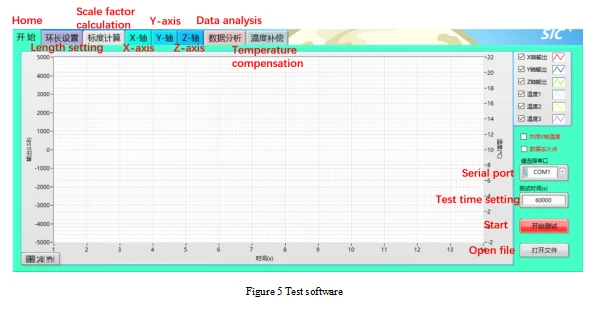
Figure 5 Test software
6. Operation method
6.1 Test instruction
The steps are as follows:
The MIOC tail fiber of the device and the tail fiber of coils to be tested shall be fused and coated. The fiber coils shall be placed on a stable platform and covered with a wind shield (if the tail fiber of coils need to led out from the environment chamber, the loose tube can be put on the tail fiber in advance before fusion splicing).
If it is necessary to measure the environment temperature value, one to three temperature test cables can be connected as required (the cables can be connected to the plug on the front panel.)
Connect the I/O serial port on the back panel with the computer through RS422/USB adapter cable.
Switch on the AC power supply (220V, 50Hz) on the back panel and press the startup button on the front panel.
Open the test software, select the right serial port, and configure the test time, scale factor, smooth time and other parameters for each axis. Click the "Start" button (which will become the "Stop" button after clicking), enter the file name where the data is saved, and start the test. When the test time is up, the software will automatically stop and save the data. You can also click the "Stop" button midway to terminate the test, and the software will still automatically save the data.
Note:the scale factor is obtained according to certain test method. The maxium test time shall not exceed 30hours, and the saved data is 1s smooth gyro bias data. During the test process, you can click to observe the data and calculation results, but you cannot use the functions of the "Scale factor calculation", "Temperature compensation", otherwise it may cause abnormal phenomena such as software lag and data loss. Note that the power must be switched off when plugging and unplugging cables.
6.2 Open file
The steps are as follows:
When the test is not started, you can open the saved test data file with the suffix ". fog". Click on "Open File" and select "Whether to use the scale factor of the data file" in the pop-up dialog box. The default selection is "Yes". If you need to set the scale factor yourself, select "No". Select the file path and wait for a few seconds for the test software to read the data file.
After reading the data file, the software automatically plots the data in each axis into curves and displays them in the corresponding charts. Click on the interface of each axis to observe its calculation results. You can also drag the cursor in the chart to select a segment in the curve, and the software will automatically calculate the bias and bais stability values of that segment.
For some test data with large jump points, you can also check "remove large points" and set "limit values for large points". The software automatically completes the removal of large points and plots the data after removal into curves to display, but this operation does not modify the original data of the read file.
7. Other instructions
When using this testing system for the first time, the following drivers need to be installed on the computer:
a) The driver for RS422/USB adapter should be installed according to the instructions, and is compatible with 32-bit and 64-bit;
b) The Labview software running environment "labview2012 run time engine" is optional based on whether the system is 32-bit or 64-bit;
c) Labview VISA driver "VISA DRV5.4"; Compatible with 32-bit and 64-bit.
|
Ordering Instruction: we also provide fiber coil single axis test system, FCTS1310A, which has the same performance specifications with the FCTS1310C. The FCTS1310A can test only one fiber coil at a time. |
Hot Tags: fcts1310c fiber coil test system, China fcts1310c fiber coil test system manufacturers, factory